Sequence diagrams
Originally published on maicher.github.io in 2018.
What is the most convenient way of communicating a design idea to another developer? In my opinion - drawing it. However, when you are working remotely it’s not as easy as taking a marker and walking to a whiteboard.
I was involved in a remote discussion once about redesigning part of an application that the team was working on.
I found myself struggling to explain my design ideas to the other developers.
“If only I could just draw it!” - I thought.
At that moment I was unprepared and I wasn’t aware of any tool that would let me draw diagrams as easily as on a whiteboard.
How developers communicate design ideas?
Sequence diagrams are an excellent way to visualize the design ideas. They are described in the Unified Modelling Language (UML) as a group of Interaction Diagrams.
They (sequence diagrams) bring clarity to your (developers) thoughts and provide a vehicle to collaborate and communicate with others. Think of them as a lightweight way to acquire an intention about an interaction. Draw them on a whiteboard, alter them as needed, and erase them when they’ve served their purpose. [1]
To illustrate what sequence diagrams are, let’s define two classes:
class A
  def call
    # do something
  end
end

class B
  def call(argument)
    # do something different
  end
end
And a third class that depends on them:
class C
  def initialize(a:, b:)
    @a, @b = a, b
  end

  def call
    result = a.call
    b.call(result)
  end

  private

  attr_reader :a, :b
end

a = A.new
b = B.new
c = C.new(a: a, b: b)
Below, is a sequence diagram that illustrates the above code:
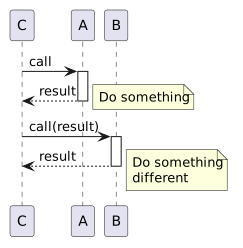
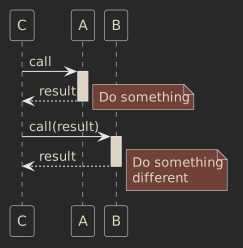
Object C sends the message call to object A (invokes a method call on object A).
Object A responds returning result to object.
Then, object C calls object B passing the obtained result as an argument and so on.
What else can we see besides the interaction between the objects? We can see which methods are being used, so the public interface of each object becomes clear. And, along with that: the boundaries between the objects and their responsibilities.
Thanks to that, looking at a sequence diagram helps to develop a quality design.
How to draw sequence diagrams during remote meetings?
Sequence diagrams, during a design process, usually need to be redrawn and changed. They evolve back-and-forth while a team is brainstorming and trying to find the best design. There are tools that allow for the drawing of sequence diagrams by dragging-and-dropping boxes and drawing arrows. However, I couldn’t imagine using them as drawing takes too much time and the listeners would lose their patience.
I was searching for a tool that would give me the possibility to efficiently adjust the diagram in “real time” - on the fly, while elaborating and interacting with others. Take a look:
As you watched the video above, you would have seen me typing code. The diagram was generated on the fly, as I was typing the commands into the editor, making the whole experience pretty interactive. I was using a standard called PlantUML with RubyMine IDE plugin.
Basic PlantUML syntax for sequence diagrams
First of all, mark the beginning and end of the diagram by keywords @startuml and @enduml.
@startuml
# sequence diagram goes here
@enduml
Then draw the diagram putting each step in a separate line and using arrows -->, <-- to indicate the direction of the communication.
@startuml
ClassA -> ClassB : call
ClassA <-- ClassB : response
@enduml
To show the processing use: activate and deactivate keywords.
@startuml
ClassA -> ClassB : call
activate ClassB
ClassA <-- ClassB : response
deactivate ClassB
@enduml
Notes can be added by using note keyword.
@startuml
ClassA -> ClassB : call
activate ClassB
ClassA <-- ClassB : response
note left: processing something
deactivate ClassB
@enduml
The whole syntax is described on the PlantUML website.
[1] Sandi Metz, Practical Object-Oriented Design in Ruby, Addison-Wesley, 2013, p.66